

How it fits together
The setup has two parts:- Extensions for the agent. Verbu signs in to One-Connect as one or more users (extensions), just like a phone. Calls to those extensions go to the agent.
- The connection to One-Connect. An administrator login to One-Connect. With it, Verbu can check if a colleague is free, move a call with the user’s number, and send call events. This part is optional.
What Verbu can do with One-Connect
Before you start
You need:- Access to the One-Connect admin at
admin.one-connect.dk, or the contact details of your Uni-tel reseller. - Your main number: the number your customers call.
- The SIP username and password of each user that Verbu signs in as.
- An administrator login to One-Connect, if you want presence checks, A-number presentation or call events.
Does your One-Connect use netblokke (IP access lists)? Then Verbu’s IP address must be on the list before Verbu can sign in. See Netblokke and IP access.
Part 1: Extensions for the agent
1
Create users in One-Connect
Go to Brugere (users) in the One-Connect admin. Create the users that Verbu signs in as, for example extension 200 and 201. Write down the SIP username and password of each user.
2
Connect One-Connect in Verbu
Go to Settings → Phone systems. Click Connect on the Uni-tel / OneConnect card. Give the connection a Name, for example “Head office”, and type your Main number. Click Save.Verbu finds your One-Connect from the main number. A workspace can have one phone system.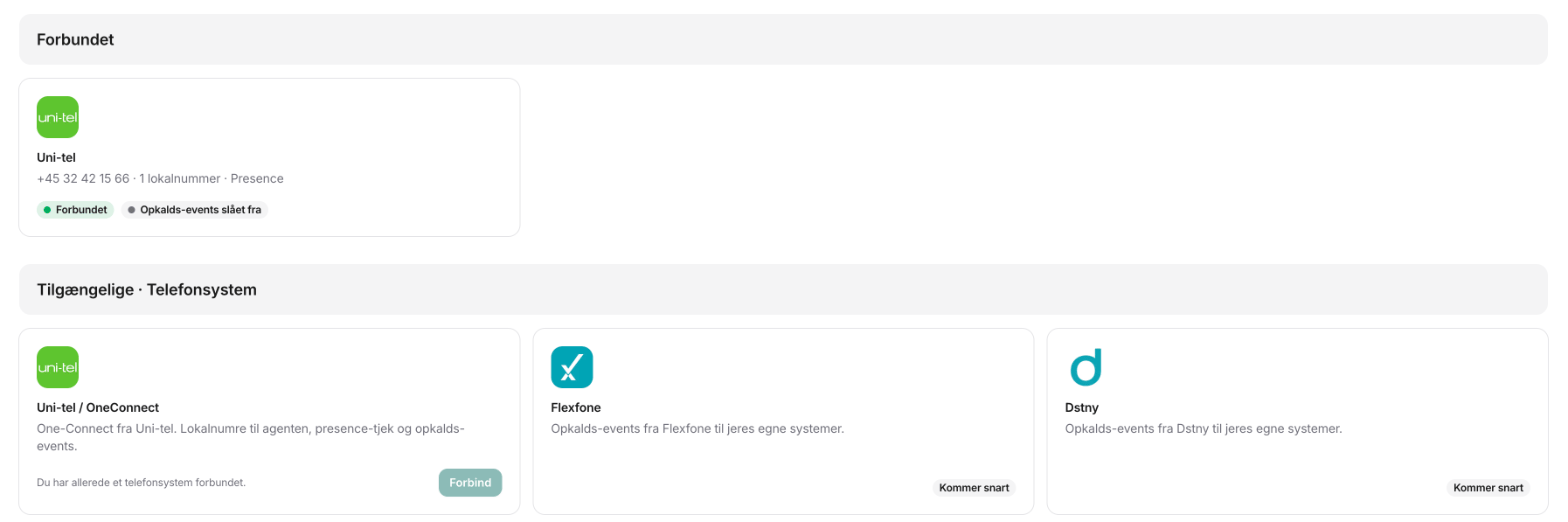
3
Add the extensions
Open the phone system. Under Local extensions for the AI receptionist, click Add extension. Type the Extension, Username and Password of the user from step 1. Do this for each user.When the extension is connected, the Status column shows Connected.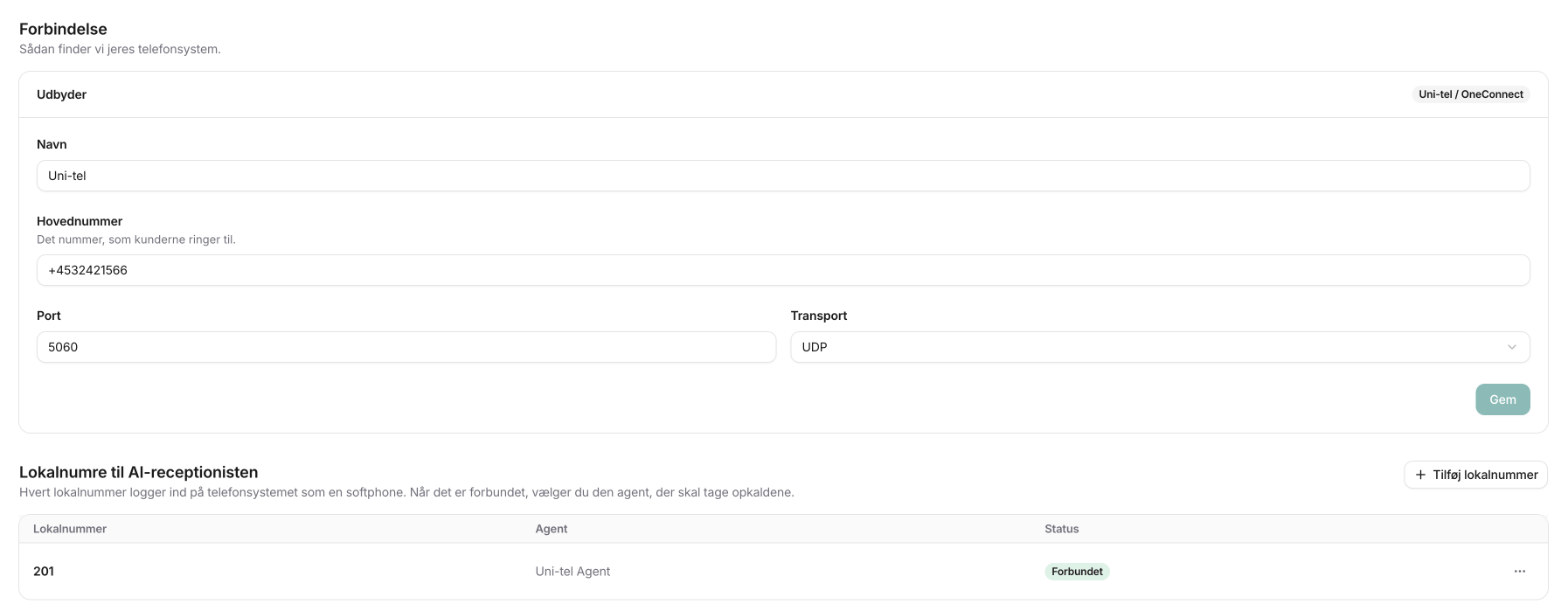
4
Choose the agent
Open the menu on the extension’s row, and click Assign to agent. Choose the agent that answers calls to the extension.
5
Send the calls to the extensions
In One-Connect: send your call plan or forwarding to the queue that holds the agent’s users. See Parallel calls with OneConnect.
6
Test
Call the number from your mobile. Check that the agent answers.
Best practice: concurrent calls
A user in One-Connect can only have one call at a time. So the number of users decides how many calls the agent can answer at the same time. Create at least two users, and put them in a queue with the ring all strategy. See Parallel calls with OneConnect.Part 2: The connection to One-Connect
Presence checks, A-number presentation and call events use One-Connect’s own interface. They all use the same login. You save it once.1
Add the login
Open the phone system under Settings → Phone systems. Click Add login in the Connection to One-Connect card. Type the One-Connect user name and Password, and click Save and test login.Use an administrator in One-Connect, not a SIP user. Verbu tests the login before it saves it. When it works, the card shows Connected.
2
Turn on the functions
The functions are in the same card, under the login. Turn on the functions you want. If you turn on a function with no login, Verbu opens the login form.
Presence checks before call transfers
Before the agent transfers a call to an extension, Verbu checks the colleague’s phone in One-Connect:- Busy: the colleague is in a call, the phone is ringing, or Do not disturb is on.
- Not connected: the colleague’s phone is not signed in.
- Free: the phone is free.
The presence check only reads if the phone is busy. It does not read the colleague’s profile or status in One-Connect, for example “Lunch” or “Meeting”. If a colleague has the profile “Meeting” but the phone is free, the agent transfers.
A-number presentation
Without A-number presentation, the agent transfers from its own extension, and the colleague sees the agent’s number. With A-number presentation, One-Connect moves the call itself, and the colleague sees the user’s number. A-number presentation only works to internal destinations in One-Connect: the extension of a user or a queue. It is a cold transfer. If you turn A-number presentation off, the agent transfers from its own extension again. The login stays saved.Send call events to a webhook
Verbu can send an event to your own systems when something happens to a call in the phone system. For example, it can open the customer’s record in your CRM when the phone rings.- Turn on Send call events to a webhook.
- Type the Destination address. The address must start with
https://. - Choose the events you want:
call.incoming: the phone rings.call.answered: the call is answered.call.ended: the call ends.
- Click Save.
- Copy the Signing secret. Verbu shows it only once. Use it to check the
X-Verbu-Signatureheader on each event.
Call events are a function for all phone systems. Today they work with Uni-tel One-Connect. Dstny, Flexfone and Telia TouchPoint come soon.
Remove the login
Click Remove login in the Connection to One-Connect card. Presence checks, A-number presentation and call events turn off, and the signing secret is deleted. The extensions for the agent still work.Optional: hand off to people during business hours
A common setup is: the team answers calls during business hours, and the agent answers the rest. You have two options:- In One-Connect: make a time-of-day rule. It sends calls during business hours to the team and the rest to the agent’s queue.
- In Verbu: let the agent answer all calls, and let it transfer to the team when that makes sense. See Forward from Verbu to OneConnect.
Troubleshooting
Verbu does not sign in to the extension
Verbu does not sign in to the extension
First, check that the SIP username in One-Connect is the same as the extension number. If they are different, One-Connect refuses the sign-in, and the row shows Refused in Verbu. Fix the username in One-Connect, and type the same username in Verbu.Then check the password and the main number. If they are correct, check if your One-Connect uses netblokke. If it does, Verbu’s IP address must be on the list.
One-Connect refuses the login
One-Connect refuses the login
Check that the user is an administrator in One-Connect, not a SIP user. Also check that the main number under Connection is correct and saved. Verbu uses the main number to find your One-Connect.
The agent transfers to a colleague who is at lunch
The agent transfers to a colleague who is at lunch
The presence check only reads if the phone is busy. It does not read the profile in One-Connect. If the colleague does not want calls, the colleague must turn on Do not disturb or sign the phone out.
A transfer to a mobile number fails
A transfer to a mobile number fails
One-Connect does not yet support transfers from the agent to external numbers. Use an extension or a queue in One-Connect. See Forward from Verbu to OneConnect.
Customers get a busy tone
Customers get a busy tone
All the agent’s users are busy, or the routing does not send the calls to the queue. Check the queue members, and add more users if it is busy. See Parallel calls.
The agent answers, but the call ends at once
The agent answers, but the call ends at once
This is probably a firewall or an SBC between Uni-tel and Verbu. Send a call ID to Verbu support, and we compare it with our logs.
I want to go back to the old setup
I want to go back to the old setup
In One-Connect: send the calls back to the old destination, for example a queue or a call group. The calls go straight to the team again.
Next steps
- More calls at the same time: Parallel calls with OneConnect
- Do you use IP access lists? Netblokke and IP access
- Let the agent transfer to your team: Forward from Verbu to OneConnect
- Get the agent ready: Build your first agent
- Not on Uni-tel? See Most PBX solutions